


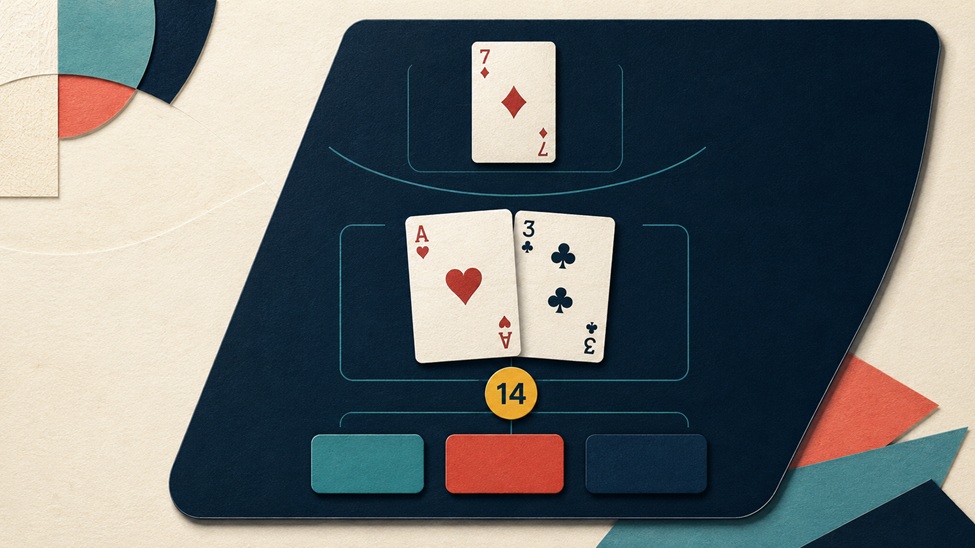
A digital card game has to translate table objects into a readable software state. In blackjack, the player needs to see the hand, the dealer’s upcard, the current total, and the actions that remain available. The cards establish the situation, the controls expose the permitted moves, and the next animation confirms what changed. When that hierarchy is clear, the screen carries much of the rules explanation without covering the table in text.
Cards and Controls Share One Screen
Game designers call information that exists inside the game world diegetic UI. An updated 2026 guide to game UI from Sketch separates those elements from non-diegetic menus, windows, and status displays seen only by the player. Digital blackjack combines both forms on one screen. The cards are game objects and information: rank affects the total, an ace can change how the total is classified, and two matching cards may open a split decision. Buttons for hit, stand, double, and split sit outside that card language, so their availability must reflect the hand on screen.
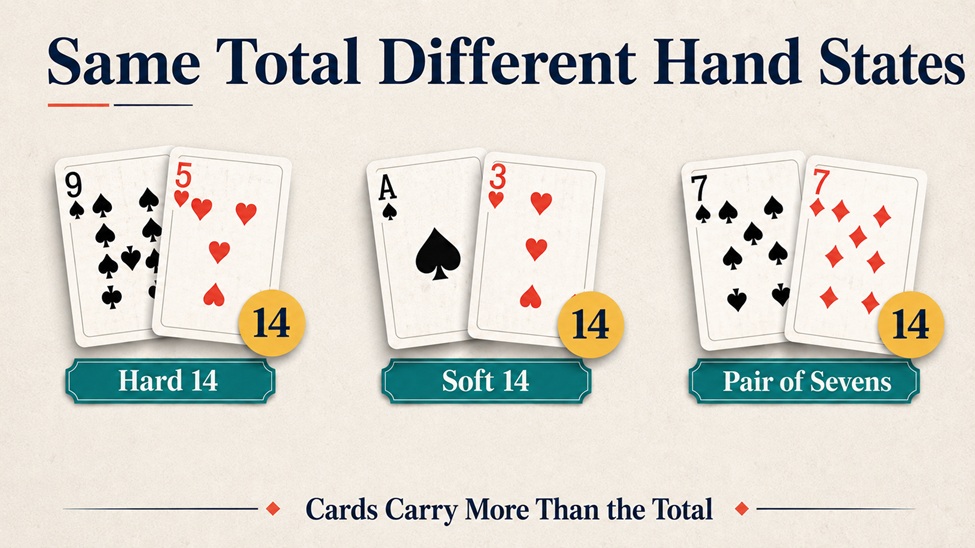
The first deal already contains several layers of state. A nine and a five make a hard 14 because it doesn't contain an ace that can be counted as 11. An ace and a three make a soft 14 because the ace retains that higher value without taking the hand over 21. Two sevens also total 14, but the matching ranks create a pair and may make splitting available under certain table rules.
During a round of blackjack table games at Cafe Casino, these distinctions have to remain visible while the dealer upcard, player total, and action controls occupy the same screen. A total badge can speed up recognition, but it cannot replace the cards. Showing only “14” would erase the difference between a hard hand, a soft hand, and a pair. The interface also needs to prevent stale choices from surviving a change of state. After another card is dealt, for example, a split control should not remain active when the hand no longer qualifies. The design is doing two jobs at once: preserving the familiar table and enforcing the rules of the digital round.
Practice tools extend that same state language beyond an active round. The video How to Memorize Blackjack Basic Strategy organizes a strategy chart into splits, soft hands, hard totals, boundary cases, and timed flashcards. Its timed drills begin with visible cards and a dealer upcard, then ask the viewer to identify the matching category before the answer appears.
Exact basic-strategy choices can change with the number of decks, whether the dealer hits on soft 17, and the rules for doubling or surrender. A training screen should therefore identify its rule set instead of presenting every chart as universal. Its strongest feedback also preserves the original hand long enough for the player to compare the cards, the chosen action, and the corrected response.
Boundary Hands Need Visible Structure
A hand can cross a category boundary after one card. Ace-six is a soft 17 because the ace can count as 11. Add a five, and the total becomes a hard 12, with the ace now counted as one. Keeping all three cards visible lets the player reconstruct the new total and see why the classification changed.
Splitting creates a different transition. One pair becomes two separate hands, each with its own cards, total, and active turn. Position, spacing, and an outline can identify which hand is awaiting input. Color may reinforce that focus, but it should not carry the distinction alone. A player who misses the color change still needs another visible cue separating the active hand from the completed one.
Feedback Should Follow the Action
Every control needs an immediate and specific response. Selecting hit should visibly depress or highlight the control before the new card arrives. The card should enter the active hand, the total should update, and unavailable actions should disappear or become clearly disabled. When the dealer begins acting, the focus should move away from the player controls, instead of leaving apparently usable buttons on screen.
Sound and motion can confirm the same event without overwhelming it. A short card movement identifies where the new information entered the layout, while a restrained sound confirms completion. A 2025 discussion of accessible game UI from Kokku notes that visual, auditory, and tactile feedback can reinforce critical information. Redundant cues are especially useful on small screens, where a subtle change in one corner may otherwise be missed.
Small Screens Need the Same Hierarchy
Responsive design should preserve the reading order rather than shrink the desktop table. The dealer upcard can remain above the player hand, with the total beside the cards and the available actions below. Decorative space can contract first. Card ranks, state labels, and controls need to remain readable and far enough apart to prevent accidental selections.
Landscape and portrait layouts may rearrange those elements, but the decision sequence should stay consistent: inspect the cards, locate the dealer upcard, check the total, then choose among the active controls. The result should update in the same area where the change occurred. Digital blackjack remains easy to follow when the interface treats each card, control, and response as part of one changing game state.